Stall: Stall Network
The Stall Network gathers open stalls in one place, connecting sellers and buyers quickly; players search and buy without visiting stalls one by one.
Registering an Item on the Network
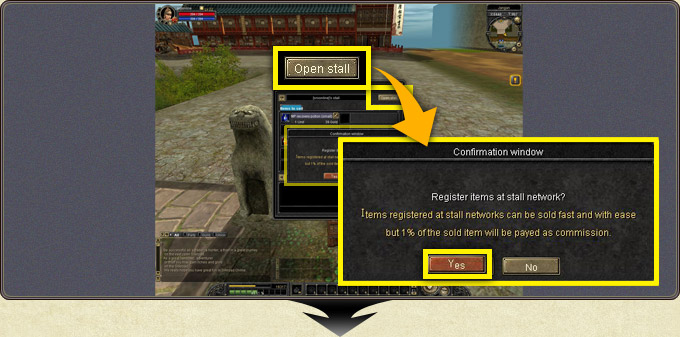
- Open the stall window, place the item and set its price.
- Pressing Open Stall brings up the network registration confirmation; Yes registers the stall on the network.
- A 1% fee of the sales amount is deducted for items sold over the network.
Purchasing over the Network
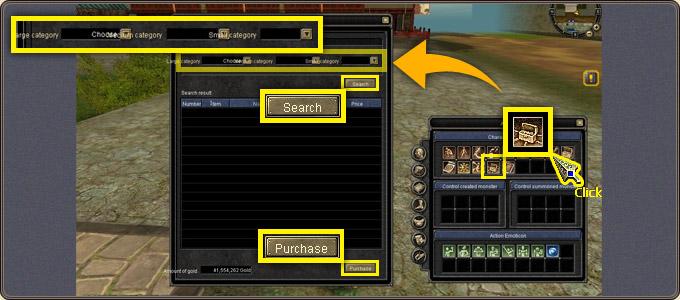
- The Stall Network window opens with the F shortcut or its action icon.
- Narrow the search with the large/middle/small category selection and press Search.
- Hovering an item in the list shows its details; select it and buy with Purchase.
- Only the stalls in your current town can be searched, the system works only in towns, and no other action can be taken while the window is open.
- Trades above 100,000 gold enter the randomly held network event; the winner receives the Merchant's Bless item: for 30 minutes, gold dropped in hunting increases 1.5 times (cannot be sold or dropped; storable only in the warehouse).