Party Matching is the fast way to recruit members or join a party; usable anywhere, any time. A normally formed party can also be registered later.
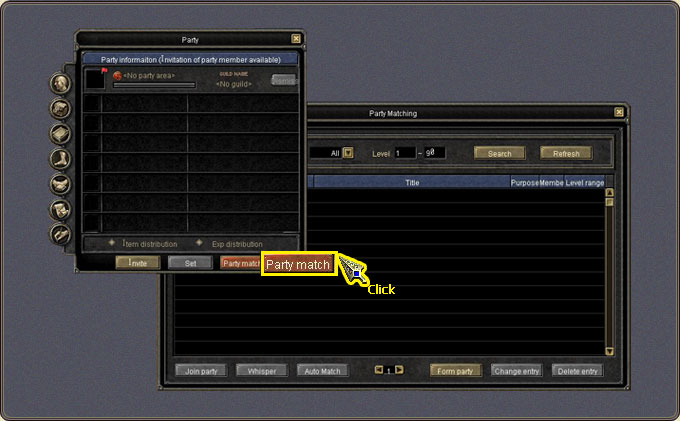
The window opens with the Party Matching button on the Party window (P).
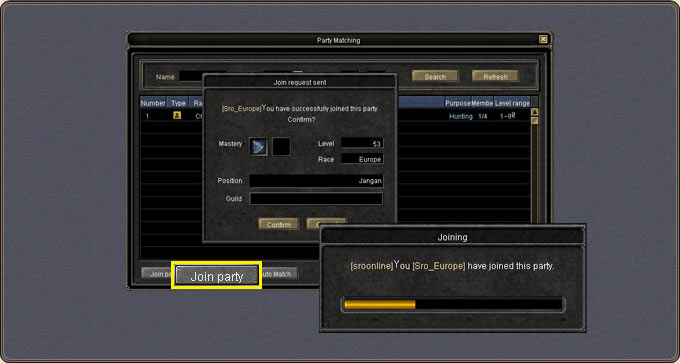
Selecting a listed party and pressing Join sends the request to the leader with an in-progress message; the leader has 10 seconds to accept, otherwise the request is cancelled.
Joining is not possible when: you are already in a party, a join condition is unmet, or you are being considered for another party.
Automatch randomly picks the party closest to your conditions; pressing Confirm in the inquiry window joins it.
When registering, a party leader's existing party is listed; a player without a party creates a new one. The party type is set only in the Party window (P) settings, not in Party Matching.
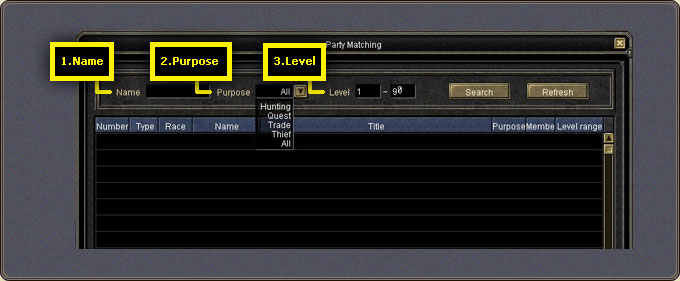
Registered parties are searched with the fields at the top: Name searches the party leader's name, Purpose searches parties with a particular purpose, and Level searches parties within the specified range.
Refreshing the list: The party list does not refresh automatically; press the refresh button to see the current list. A registered party drops off the list when: the leader cancels the registration, one hour has passed since registration or modification, the party is dismissed, the party is full, or the registered party is reduced to a single member (except at the moment of first registration).
Whisper: To learn more about a registered party, select it in the list and press the whisper button to talk to the party leader directly.
Party Matching — opening the windowParty Matching — search fields, Auto Match and Join PartyParty Matching — the join requestParty Matching — the leader's approval