Socket System Socket System
Socket items are items with sockets on them; socket stones can be mounted in the sockets to add specified skills to the item.
Properties of socket items
- Sockets can be applied only on weapons and armors.
- An item can have multiple sockets.
- According to the ability of the socket stone, the available target items are determined.
- An item cannot have two or more of the same socket stone on it.
Socket stones — Socket stones trigger at a certain probability, activating skills such as Dodging, Self Healing and HP/MP/attack rate increases. Only socket stones whose level is the same as or lower than the target item's can be used, and abilities vary among the levels.
| Item level | Chipped | Flawed | Socket Stone | Flawless | Superior | Perfect |
|---|---|---|---|---|---|---|
| Level 1-3 | ✓ | ✕ | ✕ | ✕ | ✕ | ✕ |
| Level 4-6 | ✓ | ✓ | ✕ | ✕ | ✕ | ✕ |
| Level 7-9 | ✓ | ✓ | ✓ | ✕ | ✕ | ✕ |
| Level 10 | ✓ | ✓ | ✓ | ✓ | ✕ | ✕ |
| Level 11 | ✓ | ✓ | ✓ | ✓ | ✓ | ✕ |
| Level 12 | ✓ | ✓ | ✓ | ✓ | ✓ | ✓ |
✓ mountable · ✕ not mountable
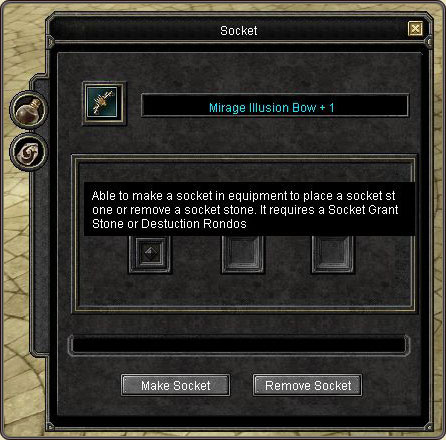
How to use the skills
- Right-click the equipped item and choose one from the list of skills to assign it to the quick slot.
- Or open the Socket Stone Alchemy window, put the item whose skill is to be used in the specified slot, and assign the skill of your choice to the quick slot.
Socket alchemy
| Operation | Requirement | Steps |
|---|---|---|
| Making a socket | Magic Stone of Socket Making (sold by the NPC in the Grocery Shop at Alexandria) | Open the Socket Alchemy window → put the magic stone in the specified slot of the item → click “Make a Socket” → click an empty slot at which to make the socket. |
| Mounting a stone | Socket Stone | Open the Socket Alchemy window → put the socket stone in the slot → click the stone to mount it on the desired slot → click “Confirm” in the confirm window. |
| Removing a socket | Rondo of Removal (sold at the Item Mall) | Open the Socket Alchemy window → put the Destruction Rondo in the slot from which to remove the stone → click “Remove a Socket” → click “Confirm” in the confirm window. |
The text in this section is from the official Silkroad Online guide documentation.
On SeaSRO every enhancement attempt is transparently logged; watch who enhanced what to which plus in the live alchemy logs.