Learning Skills The Skill Window (S)
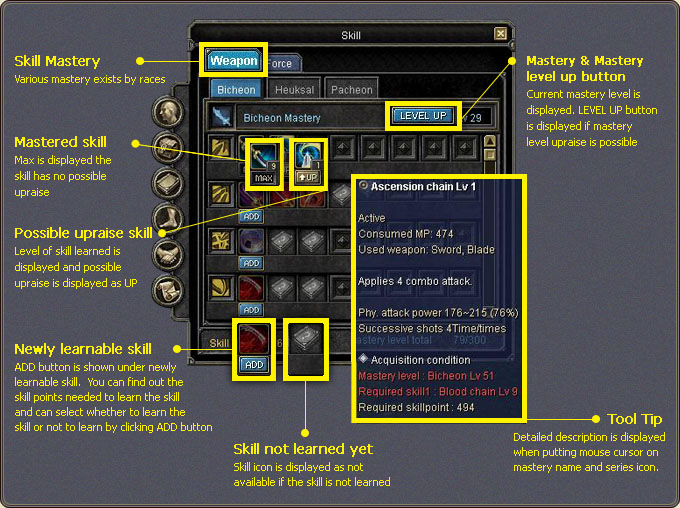
The skill window opens with S. The top tabs separate the mastery groups (Weapon / Force for Chinese) and the tabs below them the individual masteries (such as Bicheon / Heuksal / Pacheon). Each race has its own masteries.
Mastery level and LEVEL UP
- The selected mastery's current level is shown in its header; if an upgrade is possible, a LEVEL UP button appears next to it.
- The Mastery level total indicator at the bottom shows how much of your mastery limit you have used (e.g. 85/330).
Skill states
| Marker | Meaning |
|---|---|
| ADD | A newly learnable skill. The skill points needed are shown under the button; pressing ADD lets you choose whether to learn it. |
| UP | An upgradable skill. Its learned level and the possible upgrade are shown as UP. |
| MAX | A mastered skill; no further upgrade is possible. |
| Dimmed icon | A skill not learned yet and not currently available. |
Tooltip: skill details and acquisition condition
Hovering a mastery name or a series icon opens a detailed description. The tooltip lists the skill type (Active/Passive), consumed MP, the required weapon, the effect, physical/magical attack power and the number of hits. The Acquisition condition section at the bottom shows the required mastery level, prerequisite skill and skill points.
Learning a skill
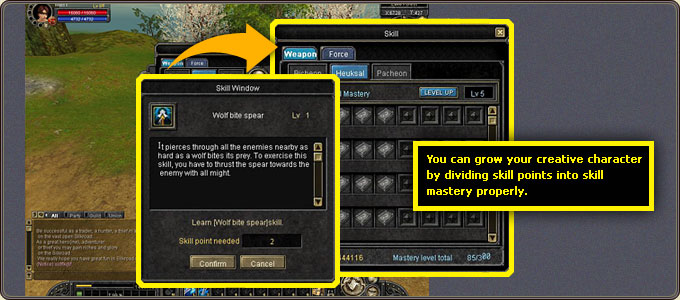
Selecting a skill opens a window with its name, level and description alongside the required skill points; Confirm learns it and Cancel aborts. Dividing your skill points across masteries properly is what shapes your character.